 Skip to content


Exhibitor’s guide

Info and deadlines
- Update your company profile as soon as possible, so visitors can explore all of the participating companies in advance.
- Please check the display name. The display name is the name under which your company will appear on the event website.
- If you have ordered or your stand includes graphic products, please remember to send the necessary materials to graphics@messukeskus.comno later than 10.01.2026. For changes made after this, we will charge according to the normal price list.
- Extended deadline! Please place additional orders via the eShop no later than 30.1.2026!
- If you have a screen at your stand and you wish to use the USB-mediaplayer, please send the screen material at latest 5.2.2026 to: https://www.dropbox.com/request/qoip7mj3OrmCbu0iR4yL
Construction:
Stand construction will take place on Wednesday, February 11, and we are unable to guarantee an exact time for when each stand will be completed. If needed, you may bring items to your stand or near your stand on Wednesday between 16:00 and 18:00. Decoration can be done on Thursday morning between 7:30 and 8:30.
If you have any large items coming to your stand or if the above schedule does not work for you, please contact us so we can check the situation together!
Event opening hours:
8:30-9:30 Networking and coffee
9:30-16:30 Expert speeches (seminars)
16:30-17:30 After Work
See all hotel room quotas and offers and book your accommodations well in advance!
Hotel room quotas and offers
Exhibitors most important tool! Through the eShop, you can handle orders and all other tasks related to fair participation easily and quickly.
Registration path:
- Go to https://eshop.expomark.fi/en-US/registration
- Fill in the requested information on the form.
- After registration, you will receive a message in your email. Confirm the user account by clicking the confirmation link in the message. Your account will be activated.
- Once you have confirmed the user account, you can log in from the home page https://eshop.expomark.fi/en-US
After logging in to the service, you can see participations in upcoming events on the front page. Choose to participate and you get to take care of the fair preparations.
NOTE! In the beginning only the contact person has the permission to see the participation. You can share the access rights from Share access rights.

Marketing and communication
All exhibitors participating in the event are published on the event’s website.
The name of your company that appears on the list will be the one you provided to the sales manager when confirming your participation in the event. If you want to change your visibility name, you can easily do so through the eShop under Market your participation. Instructions for updating your profile >>
In addition to the visibility name, you can easily upload your company logo, a link to your company’s website, and other information you want to share with event visitors (videos/images) to the list. Please complete all the necessary information about your company as soon as possible, so visitors can explore all of the participating companies in advance. The information can be easily updated through the eShop under Market your participation.
NOTE! There might be few hour delay when updating the profile.
Utilize logos and banners in your own marketing channels!
Don’t forget to tell about your participation and the products and services on display at the fair in your own marketing and communication channels, such as social media. You can use event logos, banners and images to market your event participation.
eInvitation for Professionals
eInvitation allows you to send an invitation to hundreds of customers at once – easily, ecologically, and free of charge. You can include your own greeting and company images in the digital invitation. eInvitation guides your customers to register as event attendees free of charge.
Remember to actively contact journalists and influencers and invite them to your stand. Publish press releases through the eShop under Market your participation. You can recognize journalists and other media representatives at the fair by their MEDIA passes.
More information coming soon.
With the Messukeskus Group’s Events PRO app, you can make connections, grow your business, and unlock new opportunities for success. Download the app today! Powered by Brella. Learn more: https://www.messukeskus.com/en/events-pro/
- Download the Events PRO app from either Google Play or the App Store (official name: EventsPRO Messukeskus & Expomark).
- Log in to the Events PRO platform – 6 weeks before the event begins.
Access is granted via a personal login code sent to the exhibitor’s and visitor’s email. The message is sent to the event contact persons as well as to those who have ordered an exhibitor pass. - Activate the matchmaking feature
Complete your profile by adding your interests and goals. Reach the right visitors – Events PRO, powered by Brella AI Matchmaking, helps you connect with participants who are genuinely interested in your services or products. - Explore potential customers in advance and schedule meetings
Review suggested contacts and send meeting requests. Meetings can take place at your stand or at the Meeting Point.
Below you can find couple examples of discussion openings
- Hi [First name],
I noticed you’ll be attending [event name]. We’ll be there as an exhibitor, and I was wondering if you’d have time for a short meeting during the event. It would be great to exchange thoughts on [topic/solution briefly]. - Hi [First name]! I saw that you’re attending [event name]. We’ll be there as an exhibitor, and it would be great to have a quick chat in person. Would you be open to scheduling a short meeting during the event?
- Efficient lead collection – use the QR code scanning feature to easily save and report contact details.
Lead collection is available through the mobile app (downloaded from Google Play / App Store). After the event, all collected contact details are available in Events PRO app or in the Events PRO company portal, making follow-up marketing smooth and effective. Events PRO also works via a web browser, but scanning QR codes at your stand is not supported in the browser version. - Create your personal schedule
Browse the event program, mark your favorite sessions, and provide feedback after attending.

Stand construction
Your logo for event marketing
- Please send your logo in print- and web-ready format as soon as possible to sari.ojala@expomark.fi.
- Note! The H2 Advanced stand package includes extended logo visibility!
Back wall graphics
- Please send the graphic materials no later than January 10, 2026.
- Reference for sending: Nordic Hydrogen Week / Company or Organization Name / Stand Number
Screen instructions
You can conveniently send passes to the e-mail of your fair team members via the eShop under Send passes.
You can print your name badge at the event entrance by presenting the QR code on your ticket. You can print the QR code or display it on your smartphone screen. Before the event, please make sure that you can open the pass on your phone.
The exhibitor’s pass is for the staff of your booth during the fair. The pass is personal and valid during construction, event and dismantling times of the fair. The pass must be displayed during the event. Passes are free of charge.
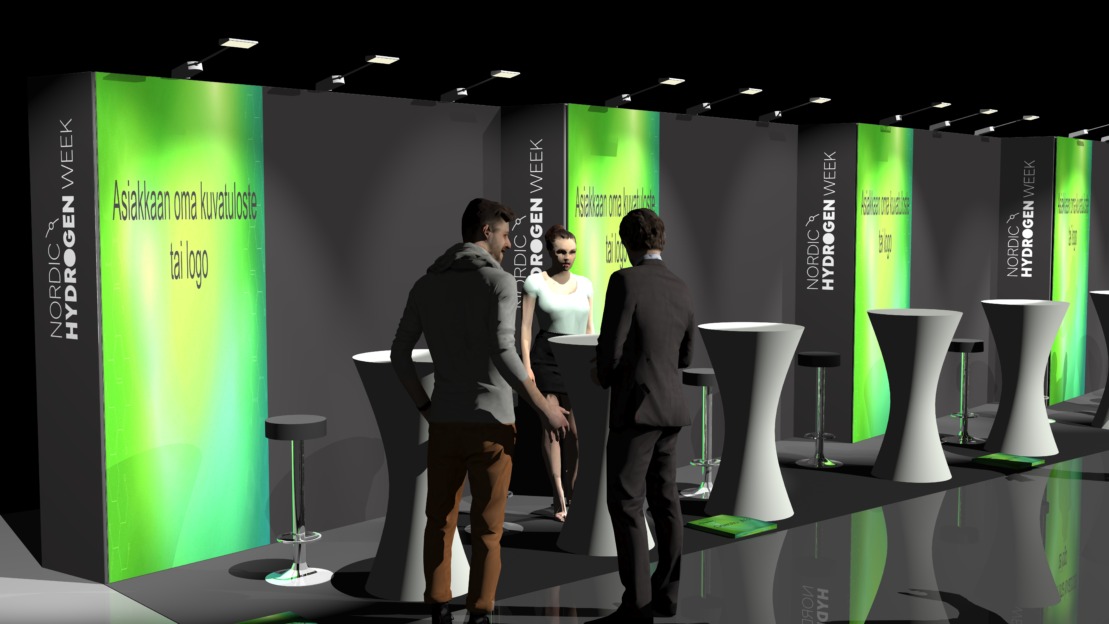
Stand includes
- Exhibition space 6 m²
- Structures: back wall graphic 1000×2450 mm, black carpet, basic lighting
- Stand furniture: two standing tables, two bar stool)
- Initial stand cleaning
- Participation includes electricity (socket 3kW/1×16 A), electricity consumption, as well as visibility and environmental fee
Visibility in marketing
- Logo and company profile in the exhibitor listing on the event website
- Logo visibility on the exhibition area screens
Events Pro networking platform
- Company profile page on the Events Pro networking platform
- Opportunity to collect leads smoothly through the platform
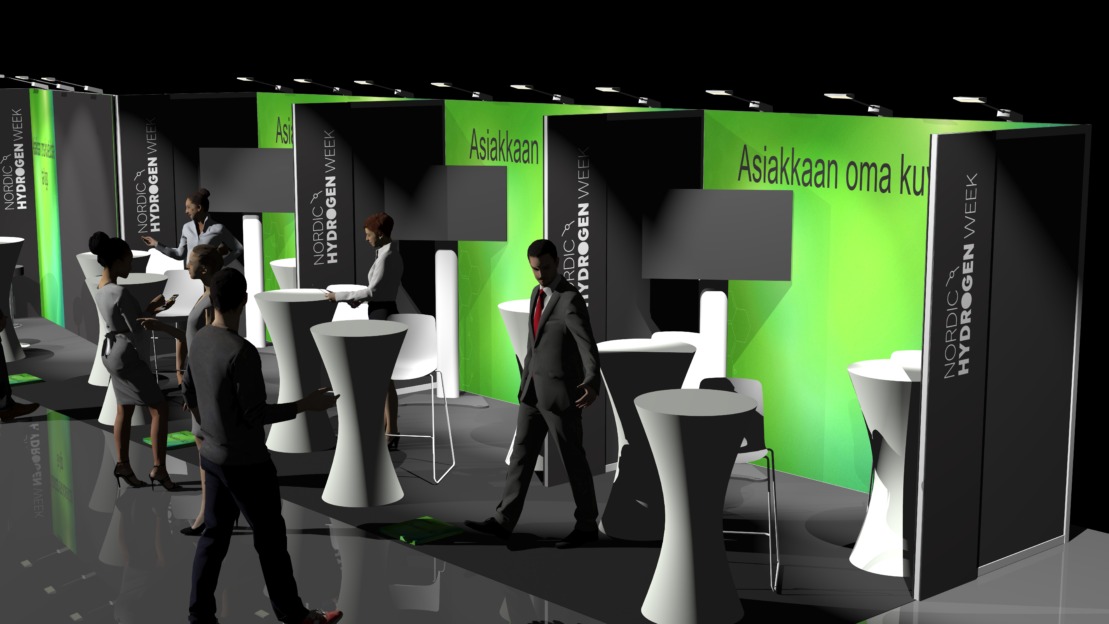
Stand includes
- Exhibition space 9 m2
- Structures: back wall graphic 2970×2450 mm, black carpet, basic lighting
- Stand furniture: 3 standing tables, 4 bar stools
- 55″ screen (Screen information (pages 3 and 4) >> )
- Initial stand cleaning
- Participation includes electricity (socket 3kW/1×16 A), electricity consumption, visibility and environmental fee
Visibility in marketing
- Logo on the event website (front page)
- Logo and company profile in the exhibitor listing on the event website
- Logo visibility on the exhibition area screens
- Logo in event newsletters
- Company introduction in a visitor newsletter
- Company introduction / other post on the event’s LinkedIn
Events Pro networking platform
- Company profile page on the Events Pro networking platform
- Opportunity to collect leads smoothly through the platform

At the event
The deliveries to the venue can be addressed:
Exhibitors name c/o and stand number
Contact person, name and phone number
Oulun Musiikkikeskus / Nordic Hydrogen Week 2026
Leevi Madetojan katu 1
90140 Oulu
Janitor phone number: +358 44 703 7201
NOTE! Deliveries can be receive starting from 10th of February.
Your stand package includes either 2 lunch vouchers (Base) or 4 lunch vouchers (Advanced). Additional lunch vouchers can be ordered in advance through the eShop no later than February 4, 2026. Vouchers included in your stand package and any pre-ordered vouchers can be collected on-site, from the middle restaurant counter. Please note that vouchers are non-refundable, and all pre-ordered vouchers will be invoiced.
On-site, lunch can be paid by card or cash.
There are only few parking spaces at Oulu Music Centre! The parking lot Sävelparkki (Säveltäjänkatu 2, Oulu) is for the event’s private use and parking is free. Disabled parking spaces in front of the main entrance. Parking with a disabled parking permit is free-of-charge.
Exhibition Shuttle bus 1
From 7:30 AM to 10:00 AM
Departures every 30 minutes from Hotel Lasaretti
Route: Lasaretti – Lapland Hotel – Radisson Blu Oulu – Scandic City – Kivisydän Otto Karhi – Music Centre – Lasaretti
Exhibition Shuttle bus 2
From 8:00 AM to 5:30 PM
Departures every 30 minutes from Kivisydän
Route: Kivisydän Otto Karhi – Music Centre – Lasaretti – Lapland Hotel – Radisson Blu Oulu – Scandic City – Kivisydän Otto Karhi
Exhibition Shuttle bus 3
From 4:00 PM to 6:00 PM
Departures every 30 minutes from the Music Centre
Route: Music Centre – Lasaretti – Lapland Hotel – Radisson Blu Oulu – Scandic City – Kivisydän Otto Karhi – Music Centre
Hotels Arina and Greenstar are located near the Kivisydän Otto Karhi stop, so for guests staying there, we recommend boarding/alighting at this stop.
Do not leave valuables on display when the fair day ends. Take care of insurance and think about whether you need additional equipment, for example display cases, locks or safety cables for computers or monitors.
Each exhibitor is obliged to take care of insuring his own goods.